 Basic Shader
Basic Shader

These Shaders have the same interface: Invisible, China, Expert, Invisible, Mirror, Pearl, Plastic, Aluminum, Bronze, Chromium, Copper and Stainless Steel.
 NB: The arrows for a material can be used to navigate between related Shader and Textures editors.
This is the initial color. To change it, click on the rectangle. The system color picker is opened.
This is the color of the Reflection. To change it, click on the rectangle. The system color picker is opened. The darker the color, the less reflective the Shader will be.
Limit: Entering a Limit value defines the maximum distance of the reflection. The value 0 means that the environment is reflected to the infinite.
Using the cursor gives a rather plastic appearance to the left and a more metallic appearance to the right. Values range from 0 to 1,000.
This is the color of the Transparency. To change it, click on the rectangle. The system color picker is opened. The darker the color, the less transparent the Shader will be.
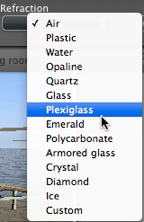
Distorts the appearance of an element placed behind a material to a greater or lesser extent. Enter a numeric value or choose the desired type in the contextual menu.
Create a new Shader from an existing Shader:

 Example
|
Artlantis User Guide:Basic Shader |
|
© 2015 Abvent www.artlantis.com |